BeepBeep Casino Registration and Login Guide
If you want to jump into the action fast, Beep Beep Casino’s registration and login flow is built so you can get from zero to spinning in a couple of minutes. We’ll walk you through every step so you always know what’s going on.
Account Registration Process
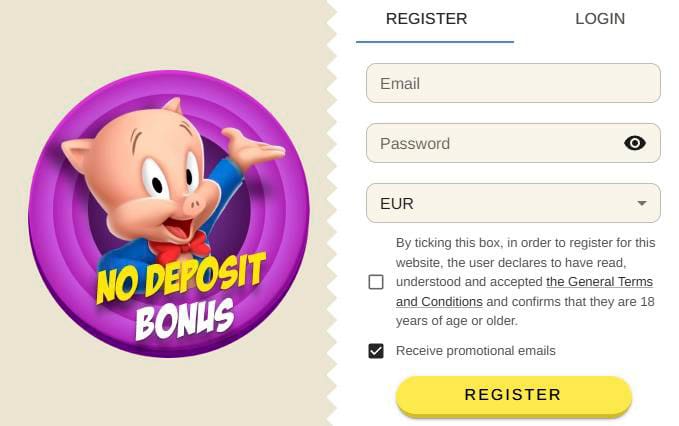
When you’re ready to join BeepBeep Casino, you just create an account, confirm you’re 18+, and agree to our General Terms and Conditions. You’ll do everything directly on the site in a simple two-field form for email and password.
Required Information
To go through Beep Beep Casino signup, you only need a valid email address and a password that meets our minimum length and complexity rules. You also need to confirm you’ve read and accepted the General Terms and Conditions and that you’re at least 18 years old.
What you’ll enter at Beep Beep Casino signup:
| Field | What it’s for | Required |
| Login name and contact address | Yes | |
| Password | Protects access to your balance | Yes |
| Promo consent | Optional marketing emails | No |
| Terms checkbox | Confirms T&C and 18+ status | Yes |
If your email is already in use or registration is blocked for your IP or country, you’ll see a clear on-screen message, and you won’t be able to complete the Beep Beep Casino signup.
Password Requirements and Security
Here’s the thing: we’re strict on passwords so your account stays safer. Your password must be at least 8 characters long, not too long, and contain at least one Latin letter and one digit.
- Use a unique password you don’t reuse in other services.
- Avoid obvious patterns like “password123” or your birthdate.
- Never share your password with anyone, including support.
- Enable extra checks like email confirmation on key actions where available.
If your password is too short, too long, or doesn’t meet the format, you’ll see an instant error so you can fix it on the spot.
Email Verification Steps
After you submit the form, a Beep Beep verification email is sent to the address you provided. You need to open that email and click the link so we can fully activate your account and let you access all features and bonuses.
- Check your inbox right after Beep Beep Casino’s registration.
- If you don’t see the letter, look in the spam folder as prompted by the site.
- Once you click the activation link, your account switches to active status.
- If you still don’t get the email, contact support from the site footer.
Until you verify your email, you might be limited in what you can do, so it’s better to complete this step right away.
Login to Your Account
Now, once your account is active, logging in just takes a couple of clicks. You’ll always log in using the same email and password you registered with.
Desktop Login
On the desktop, you’ll see the Login button in the header of the site, which opens a small form over the lobby. There, you enter your email in the “Email” field and your password in the “Password” field, then click the main login button.
- Open beepbeepcasino.com in your browser.
- Click the Login button in the top area.
- Type your email and password in the two fields.
- Hit the primary login button and wait a second for the redirect.
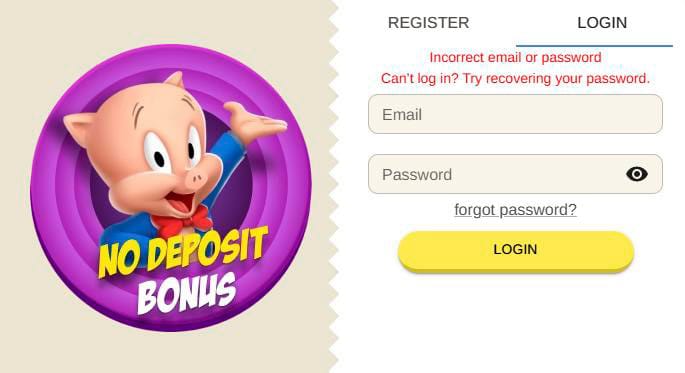
If the email or password is incorrect, you’ll see a message like “Incorrect email or password”.
Mobile Browser Access
If you prefer to play from your phone, you can log in through the same site using a mobile browser. The layout is just compressed into a drawer-style header, but the login form fields are identical.
Desktop vs mobile login
| Aspect | Desktop site | Mobile browser |
| Login button position | Top header bar | Header / mobile menu |
| Form fields | Email + password | Email + password |
| Flow | Inline dialog | Full-screen style dialog |
| Errors | Same error texts | Same error texts |
You don’t need a separate app or account; one Beep Beep Casino login works on any device.
Troubleshooting Login Issues
If you can’t log in, the interface gives you different messages depending on the issue. For example, you might see “Incorrect email or password”, “Email not found”, or “Your account is locked”.
- Use “Forgot password?” if you’re not sure about your password.
- Check that you typed your email exactly as you did during Beep Beep registration.
- If you see “Account is locked” or country/registration restrictions, contact support.
- Make sure Caps Lock isn’t messing with your password input.
If Beep Beep registration is restricted from your IP or country, the message will say that registration or access is not available, and you’ll need to reach customer service.
Account Credentials Management
Here’s where you keep control over your Beep Beep Casino login details and make sure nobody else gets in. You can always change or restore your password using the same email you registered with.
Password Recovery Options
If you forget your password, the Beep Casino login dialog has a “Forgot password?” link that starts password recovery. After you enter your email, we’ll send instructions and, in most cases, a new password to your mailbox.
How password recovery works
| Step | Action you take | What happens next |
| 1 | Click “Forgot password?” | The recovery form appears |
| 2 | Enter your registered email | System checks if the email exists |
| 3 | Submit the form | “Email not found” or success notice |
| 4 | Open your mailbox | A new password or reset link is sent |
If the system says “Email not found”, double‑check you’re using the same email you registered with.
Account Security Tips
We want you to feel safe every time you log in and play. The platform already enforces password rules, IP checks, and account blocking if needed, but you can boost your own security too.
- Don’t share your BeepBeep Casino login or password with anyone, including “helpers”.
- Always log out on shared devices using the logout button in the header.
- Avoid using public Wi‑Fi for deposits or withdrawals when possible.
- Contact support immediately if you notice strange activity or emails.
If needed, the casino can lock your account and set an unlock date, which you’ll see in the “account has been blocked” message.
Terms and Age Requirements
Now, before you can register at BeepBeep Casino, you must accept the General Terms and Conditions and confirm you’re at least 18 years old. This is done via a dedicated checkbox in the registration window that clearly states you’ve read, understood, and accepted the rules.
- You can’t complete Beep Beep registration without ticking the Terms and 18+ checkbox.
- The Terms may be updated, and changes come into force at least two weeks after announcement.
- If you don’t agree with the new Terms, you can stop using the services before they take effect.
- Gambling is flagged as potentially addictive and must be done responsibly, with 18+ warnings visible on the site.
If your country is blocked, you’ll see a message that registration or website access isn’t available, and you’ll be asked to contact support if needed.

FAQ
You need a valid email, a password that meets our rules, and to tick the box confirming you accept the General Terms and Conditions and that you’re 18 or older.
First, check your spam folder, as the interface suggests, and if the letter still isn’t there, contact support so they can resend or help you verify your account.
This means there’s already an account registered with that email, so you either need to log in with it or use the password recovery option if you forgot the password.
That message shows when registration or access from your IP or country isn’t allowed under our rules, and the prompt will tell you to contact customer service if you have questions.
You’ll see a notice like “Your account is locked” or with an unlock date, and you’ll need to reach out to support to understand the reason and whether it can be reopened.